The best SaaS video tools in 2026
A disclosure first: I built Teasr, and it is one of the tools in this list, so I am biased. It comes first because it is mine, but I tried to be fair to the rest, and every tool below gets a plain description, who it suits best, its pricing as listed on its own site, and one limitation worth knowing before you pay. I checked every price on October 12, 2026, and SaaS pricing moves often, so confirm on the vendor's page before you buy.
SaaS teams tend to need two kinds of video. There is the short promo, the 15 to 60 second piece that goes on the homepage, in a launch post or in a paid social campaign, and there is the explainer, which is longer and walks someone through what the product does and why it matters. Some tools are good at one and poor at the other, so I have tried to be clear about which is which.
1. Teasr
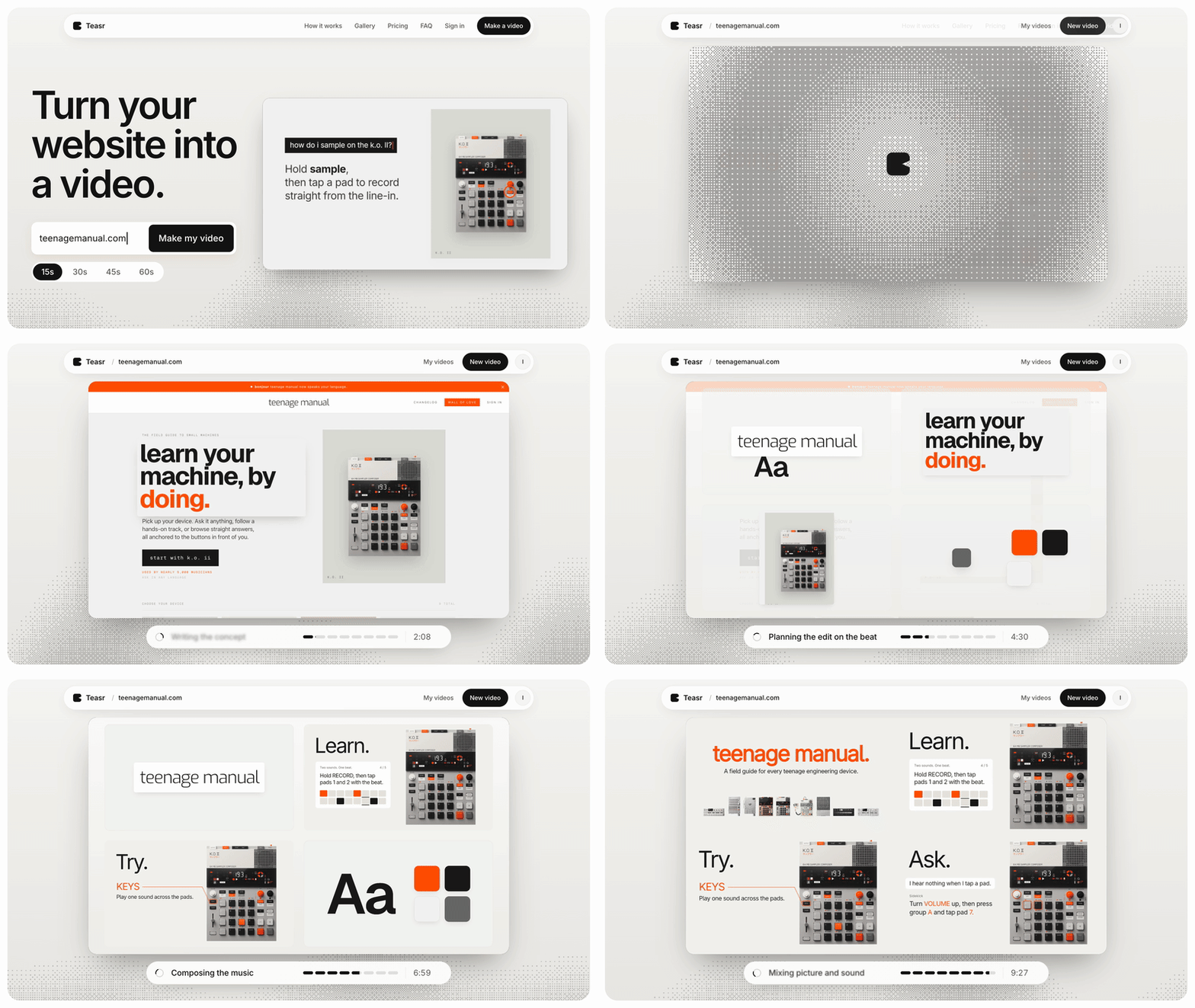
Teasr makes short promo videos from a website. You paste your URL, it reads your colours, fonts, copy and product images, turns them into a 15 to 60 second motion video and writes an original piece of music for it. Most videos are ready in about 10 minutes, at 1080p and 60 fps, and you ask for changes in plain language.

Best for: SaaS teams that want an on-brand promo for the homepage, a launch or a social campaign without briefing an agency or opening a motion design tool.
Pricing: pay per video, no subscription required: €19.50 for 15 seconds, €29.50 for 30, €39.50 for 45 and €49.50 for 60. The first change to a video is free and each one after that is €4.50. The Studio plan is €49 a month for three videos, with changes included and early access to vertical videos.
Limitation: Teasr is built for promos, not explainers. It does not record your screen, has no voiceover or avatars and is not a general video editor, so it cannot walk someone through a feature step by step. It also depends on your website, so a site with few visuals gives it less to work with.
2. Synthesia
Synthesia generates videos with AI presenters. You write a script, pick an avatar and a voice, and it produces a talking-head video in many languages, which is why it is popular for training, onboarding and internal explainers.
Best for: explainer and onboarding videos that need a presenter, especially when you have to produce them in several languages.
Pricing: a free plan with a watermark and 10 minutes of video a month; Starter is $29 a month, or $18 a month billed yearly, and Pro is $89 a month, or $64 billed yearly.
Limitation: an AI presenter in front of a slide is a good fit for training content but tends to feel corporate for a homepage promo, and many viewers can tell it is generated.
3. HeyGen
HeyGen is another AI avatar video platform, with stock and custom avatars, voice cloning and translation, aimed at marketing and sales teams as much as training.
Best for: personalised sales videos, translated versions of existing videos, and explainers with a presenter where you want a custom avatar of someone on your team.
Pricing: free for three videos a month of up to one minute each; Creator is $29 a month ($24 billed yearly) and Pro is $49 a month ($39 billed yearly).
Limitation: like Synthesia, the output centres on a person talking, which is the wrong shape for a short brand promo, and usage is metered in credits, so heavy use needs watching.
4. Descript
Descript is a video and podcast editor where you edit by editing the transcript, with AI tools for removing filler words, cleaning up audio, recording your screen and generating clips.
Best for: founder-led explainer videos and screen-recorded walkthroughs where someone on the team is talking and you want to edit quickly.
Pricing: a free plan that exports at 720p with a watermark; Hobbyist is $24 a month ($16 billed yearly), Creator is $35 a month ($24 billed yearly) and Business is $65 a month ($50 billed yearly).
Limitation: it makes recorded footage better, but it does not design anything for you, so a polished, animated promo is still on you.
5. Canva
Canva is the design tool most marketing teams already use, and its video editor, templates and AI generation tools mean you can make a promo next to the rest of your social assets.
Best for: teams that already use Canva for brand assets and want to make simple promos and social clips from templates.
Pricing: free, with Pro at $144 a year for one person and Business at $250 a year per person.
Limitation: template-based videos look like templates unless someone with design skill reworks them, and getting animation to feel tied to your product takes time.
6. Animoto
Animoto is a drag-and-drop video maker built around templates, with screen and webcam recording, stock media and a licensed music library.
Best for: small marketing teams that want to assemble promo and social videos from their own clips and photos without learning an editor.
Pricing: a free plan with a watermark at 720p; when I checked from Europe, Basic was listed at €7 a month and Professional at €14 a month, both billed yearly, with prices shown in euros.
Limitation: the templates lean towards general business and social content, so a software product with UI screenshots can feel squeezed into a format built for photos.
7. Renderforest
Renderforest combines template-based video making with AI video, image and voice generation on a credit system, alongside logo and website tools.
Best for: teams that want a broad set of templates and AI generation models in one subscription and are happy to work within credits.
Pricing: when I checked from Europe, Lite was €8 a month, Pro €17 a month and Business €29 a month, all billed yearly.
Limitation: the cheapest plan exports templates at 720p, and with so many models and credit types it takes some time to understand what you are paying for.
8. An agency or freelance motion designer
For a flagship explainer or a brand film, a human team with a scriptwriter, illustrator, animator and voice actor is still the high end.
Best for: funded SaaS companies that need a custom explainer which will sit on the homepage and in sales decks for a year or more.
Pricing: it depends entirely on scope and on who you hire, so get several quotes.
Limitation: production takes weeks, the cost is far higher than any tool here, and when your product changes the video goes out of date with no quick way to update it.
How to choose
Decide first whether you need a promo or an explainer. For a short promo that looks like your brand, Teasr gets you there fastest when your website is already in good shape, and Canva or Animoto work if you want to assemble one yourself from templates. For an explainer with a person talking, Descript is the best choice when that person is you or a teammate, and Synthesia or HeyGen are worth a look when you would rather use an AI presenter or need many languages. Renderforest sits in between, with lots of templates and generation models in one place. An agency makes sense when the video is a long-term centrepiece and the budget allows it. Many SaaS teams end up with one of each, a short promo for the top of the funnel and a longer explainer for people who are already interested.
| Tool | Best for | Starting price |
|---|---|---|
| Teasr | On-brand promo from your website in about 10 minutes | €19.50 per 15s video |
| Synthesia | AI presenter explainers and training in many languages | Free, Starter $18/month yearly |
| HeyGen | Avatar videos, personalised sales clips, translation | Free, Creator $24/month yearly |
| Descript | Editing founder-led and screen-recorded explainers | Free, Hobbyist $16/month yearly |
| Canva | Template promos next to your other brand assets | Free, Pro $144/year |
| Animoto | Drag-and-drop promos from your own clips | Free, Basic €7/month yearly |
| Renderforest | Templates plus AI generation on credits | Lite €8/month yearly |
| Agency or freelancer | Custom flagship explainers | Varies by quote |