The best demo video tools in 2026
I should say this up front: I built Teasr, one of the tools in this list, so I am biased. I list it first because it is mine, but in this article in particular I have tried hard to be fair, because for most of what people mean by a "demo video" there are better tools than mine, and I would rather you pick the right one. Each tool below gets a description, who it is best for, its pricing as shown on its own site, and one honest limitation. All prices were checked on October 12, 2026.
"Demo video" covers a few different things. There is the walkthrough, where you show someone how to do a task step by step. There is the interactive demo, a clickable tour of your product that a visitor can explore on your website without signing up. And there is the short overview, a quick, polished piece that shows what the product is and how it feels before anyone commits to a longer demo. The first two are where screen recorders and interactive demo platforms shine, and the third is where Teasr fits.
1. Teasr
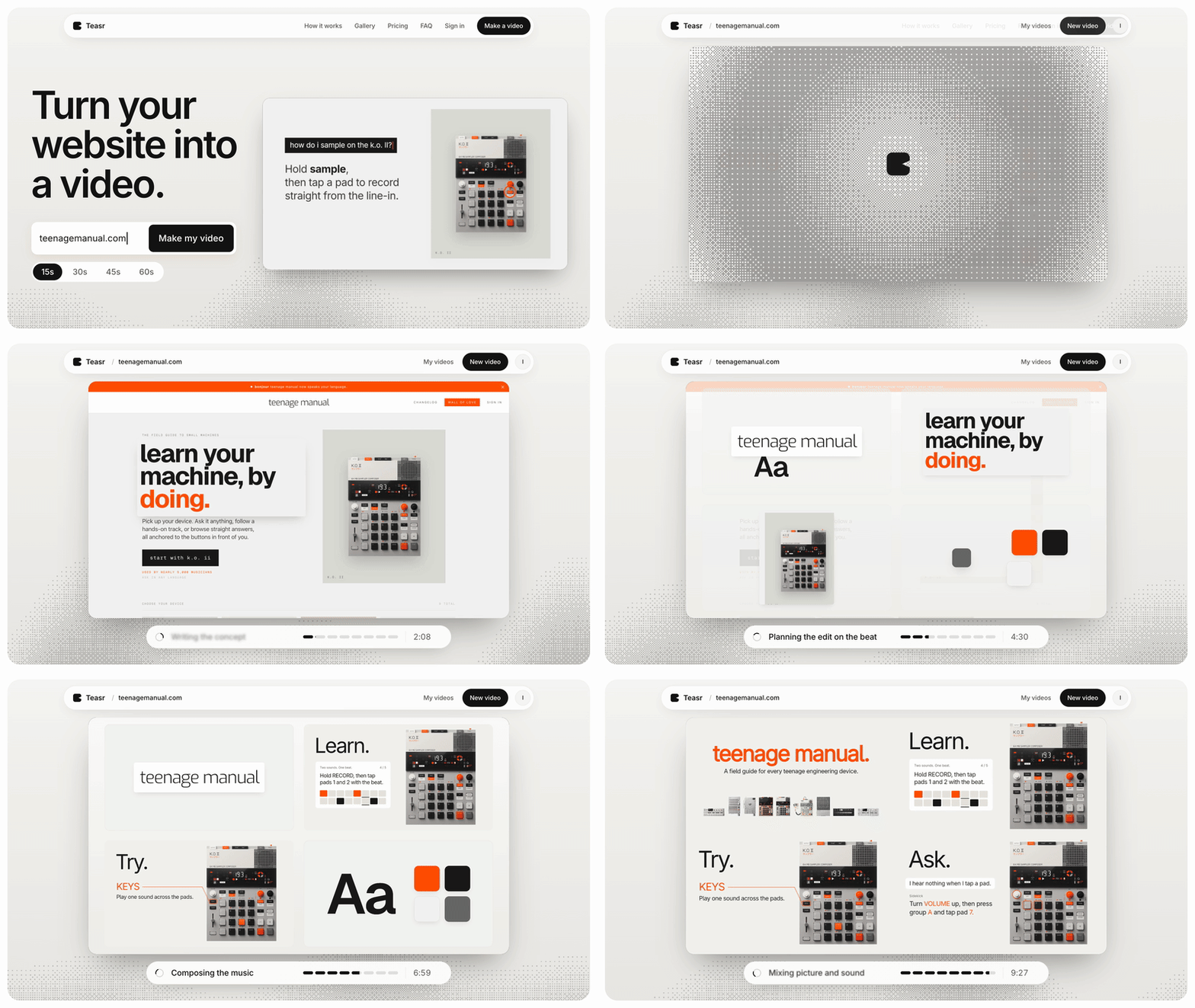
Teasr turns a website URL into a 15 to 60 second motion video. It pulls your colours, fonts, copy and product images from the page, animates them into a short piece in your brand and writes original music for it, and the video is usually ready in about 10 minutes, at 1080p and 60 fps.

Best for: a short, polished overview at the top of a page or a social post, the piece that makes someone want to see the full demo.
Pricing: pay per video, no subscription required: €19.50 for 15 seconds, €29.50 for 30, €39.50 for 45 and €49.50 for 60. The first change to a video is free and later changes cost €4.50 each. The Studio plan is €49 a month for three videos, with changes included and early access to vertical videos.
Limitation: Teasr is not a demo tool in the walkthrough sense. It does not record your screen, there is no voiceover or avatar, it is not an editor, and it works from your website, so it cannot show someone how to complete a task in your app. If that is what you need, use one of the tools below.
2. Screen Studio
Screen Studio is a Mac screen recorder that turns raw recordings into clean product videos, with automatic zoom on clicks, smoothed cursor movement, captions, device frames and layouts for your camera.
Best for: recorded product walkthroughs that need to look polished, such as feature announcements, onboarding videos and tutorials.
Pricing: $29 a month, or $9 a month billed yearly, with every feature on every plan.
Limitation: it only runs on macOS, and while it makes a recording look good, the pacing and the story still depend on how well you plan and record the take.
3. Loom
Loom is the quick way to record your screen and camera and share a link, with transcripts, comments and viewer analytics built in.
Best for: fast, informal demos for a specific person, like a prospect, a customer with a question or a teammate, where speed matters more than polish.
Pricing: the free Starter plan allows 25 videos per person and five-minute screen recordings at up to 720p; Business is $18 per user a month and Business + AI is $24 per user a month, both less when billed yearly.
Limitation: Loom videos look like what they are, a person talking over their screen, which is perfect for one-to-one communication but less suited to a demo on your homepage.
4. Arcade
Arcade captures your product as you click through it and turns that into an interactive demo with hotspots and callouts, and it can also produce video versions with AI voiceover.
Best for: clickable demos embedded on a landing page, in docs or in a launch post, where you want visitors to explore at their own pace.
Pricing: free for one user, one published demo and one published video; Growth is $50 per seat a month, or $42.50 billed yearly.
Limitation: the free plan's single published demo and video is too little for most teams, so in practice you are looking at the paid plan.
5. Supademo
Supademo is an interactive demo platform that lets you build guided demos from screenshots or recordings, with AI for personalising text, branching, analytics and, on higher plans, HTML-based demos.
Best for: teams that want to start with interactive demos on a free plan and grow into sales and customer success use cases.
Pricing: free for one creator with five guided demos; Scale is $50 a month per creator, or $38 billed yearly, and Business is $249 a month, or $199 billed yearly.
Limitation: the more advanced features, like HTML demos and sandboxes, sit on the much more expensive Business and Growth plans.
6. Storylane
Storylane builds guided interactive tours from screenshots, videos or captured HTML, with lead capture, analytics and AI voiceovers, and it targets both marketing and sales teams.
Best for: B2B SaaS companies that want interactive demos on the website and in sales conversations, with CRM integrations.
Pricing: free for one seat and one published demo; Starter is $40 a month for one seat, and Growth is $500 a month with five seats.
Limitation: the jump from Starter to Growth is large, and HTML demos, A/B testing and personalisation tokens all live on Growth or above.
7. Navattic
Navattic is an interactive demo platform aimed at product marketing and sales teams, with HTML capture, AI copilot features, AI avatars on paid plans and deep CRM and sales tool integrations.
Best for: larger SaaS teams that want interactive demos tied into their marketing and sales stack, with account identification and pipeline reporting.
Pricing: a free Starter plan with one demo; prices for the paid Base and Growth plans are not listed publicly, so see their pricing page or talk to sales. There is also a startup plan for small, early-stage teams.
Limitation: with no public prices on the paid plans, it is hard to budget for without a sales conversation, and it is more platform than a small team needs.
8. Descript
Descript records your screen, webcam and microphone and lets you edit the result by editing the transcript, with tools for removing filler words and cleaning up audio.
Best for: longer narrated demos and tutorials where someone is talking throughout and you want to cut mistakes as if you were editing a document.
Pricing: free with 720p, watermarked exports; Hobbyist is $24 a month ($16 billed yearly) and Creator is $35 a month ($24 billed yearly).
Limitation: it is an editor first, so screen recordings do not get the automatic zoom and cursor polish of a dedicated tool like Screen Studio without extra work.
How to choose
Start with what the viewer should be able to do afterwards. If they need to learn how to do something in your product, record it, with Screen Studio for polish, Loom for speed or Descript for narrated, editable tutorials. If they should explore the product themselves before talking to you, an interactive demo is the better format, with Arcade and Supademo being the easiest to start with and Storylane and Navattic built for bigger sales teams. If they just need to understand what the product is and feel something about it in under a minute, that is where a short overview from Teasr fits, and it works well at the top of a page with a walkthrough or interactive demo further down. Most teams need two of these, and very few need all of them.
| Tool | Best for | Starting price |
|---|---|---|
| Teasr | Short, polished product overview from your website | €19.50 per 15s video |
| Screen Studio | Polished recorded walkthroughs (Mac) | $9/month billed yearly |
| Loom | Quick one-to-one screen and camera demos | Free, Business $18/user/month |
| Arcade | Embeddable clickable demos | Free, Growth $42.50/seat/month yearly |
| Supademo | Interactive demos with a usable free plan | Free, Scale $38/month yearly |
| Storylane | Interactive demos for B2B marketing and sales | Free, Starter $40/month |
| Navattic | Interactive demos tied into the sales stack | Free, paid plans on request |
| Descript | Narrated tutorials edited by transcript | Free, Hobbyist $16/month yearly |